Dynamic Pricing
Required Role
Administrator or Box Office can configure dynamic pricing through ticket class allocations.
Navigation: Productions > [Production Name] > Performances > [Performance] > Ticket Class Allocations
Overview
Dynamic pricing in Stagemgr allows ticket classes to automatically shift sales from one price tier to another based on demand or timing. This is configured through the shiftable settings in each performance's ticket class allocation table. When a trigger condition is met, the system redirects new purchases from the original class to a different (typically higher-priced) class.
How It Works
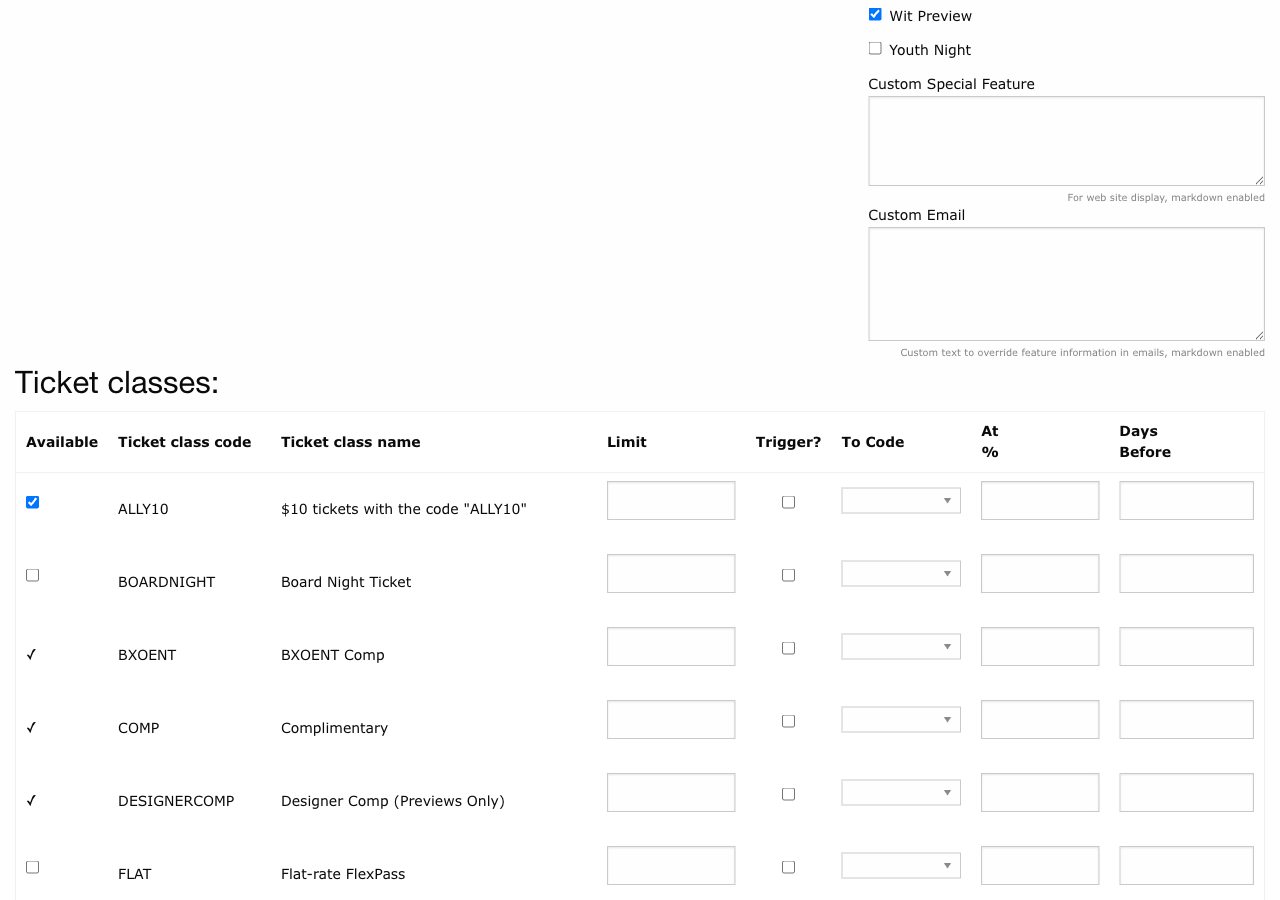
Dynamic pricing operates on a per-performance, per-ticket-class basis. Each allocation row can be marked as "shiftable" and given trigger conditions. When a trigger is met, Stagemgr switches the shiftable class off for that performance and switches its target class on, so new purchases land on the target tier.
Triggers are evaluated by a nightly sweep (around 1:00 AM) over every performance of every on-sale production, and immediately after a performance is saved in the admin. A performance that crosses a capacity threshold during the day keeps selling the lower tier until one of those runs.
The Three Configuration Fields
| Field | Description |
|---|---|
| Shiftable | Checkbox. Must be checked to enable dynamic pricing for this allocation. |
| Shift To Code | The ticket class code that sales shift into when triggered. Select from the dropdown of available classes. |
| Shift When Capacity Over | A percentage (0--100). The shift activates when the performance's overall sold percentage exceeds this value. |
| Shift Days Before Performance | A number of days. The shift activates when the current date is within this many days of the performance date. |
Trigger Logic
A shift activates when either trigger condition is met (they are evaluated with OR logic):
- Capacity trigger:
(tickets sold / total capacity) * 100 >= shift_when_capacity_over - Time trigger:
days until performance <= shift_days_before_performance
When either condition is true at the next evaluation, the shiftable class is switched off and the shift_to_code class switched on for that performance.
Using One Trigger
You do not need to set both triggers. Set capacity to 0 if you only want time-based shifting, or set days to 0 if you only want demand-based shifting.
Cascading Shifts
The shift-to target class can itself be shiftable, creating a cascade of price tiers. Stagemgr follows the chain until it reaches a non-shiftable class or a class whose trigger conditions are not met.
To prevent infinite loops, the system stops after 15 iterations of cascading shifts.
Example: Three-Tier Cascade
Consider a 100-seat performance with these ticket classes and allocations:
| Code | Name | Price | Shiftable | Shift To | Capacity Over | Days Before |
|---|---|---|---|---|---|---|
EA |
Early Bird | $20 | Yes | GA |
50% | 14 |
GA |
General Admission | $35 | Yes | PREM |
80% | 3 |
PREM |
Premium | $50 | No | -- | -- | -- |
How this plays out over time:
-
Weeks before the show, low sales (30% sold): Patrons see and can buy
EAat $20. Neither trigger is met. -
Sales cross 50% capacity (or 14 days before the show): The
EAallocation shifts toGA. Patrons who would have bought Early Bird now see General Admission at $35 instead. The Early Bird class effectively closes. -
Sales cross 80% capacity (or 3 days before the show): The
GAallocation shifts toPREM. Now General Admission redirects to Premium at $50. SincePREMis not shiftable, it remains the final price tier. -
Both triggers cascading: If it is 3 days before the show AND capacity is at 85%, a patron attempting to buy
EAfollows the chain: EA shifts to GA (time trigger met), GA shifts to PREM (both triggers met). The patron is offered Premium at $50.
Worked Example: Demand-Based Only
A 200-seat cabaret show wants prices to rise as seats sell:
| Code | Name | Price | Shiftable | Shift To | Capacity Over | Days Before |
|---|---|---|---|---|---|---|
T1 |
Tier 1 | $15 | Yes | T2 |
40% | 0 |
T2 |
Tier 2 | $25 | Yes | T3 |
70% | 0 |
T3 |
Tier 3 | $35 | No | -- | -- | -- |
- 0--79 seats sold (under 40%): Tier 1 at $15
- 80--139 seats sold (40--69%): Tier 2 at $25
- 140+ seats sold (70%+): Tier 3 at $35
Days before is set to 0, so only capacity percentage matters.
Worked Example: Time-Based Only
A main stage show wants to increase prices as the performance approaches, regardless of sales volume:
| Code | Name | Price | Shiftable | Shift To | Capacity Over | Days Before |
|---|---|---|---|---|---|---|
ADV |
Advance | $30 | Yes | REG |
0 | 21 |
REG |
Regular | $40 | Yes | DOOR |
0 | 1 |
DOOR |
Door | $50 | No | -- | -- | -- |
- More than 21 days out: Advance at $30
- 21 days to 2 days out: Regular at $40
- Day of show: Door at $50
Capacity over is set to 0, which means the capacity trigger is always met -- but in practice, the time trigger is the controlling factor since 0% is always exceeded.
Capacity Over = 0
Setting shift_when_capacity_over to 0 means the capacity trigger is always active (any sales at all meet the condition). This is intentional when you want time-based-only shifting, but be aware it also means the shift activates as soon as the first ticket is sold if the time trigger is not constraining it.
Configuration Tips
-
Start simple. A two-tier shift (early bird to regular) is easy to understand and communicate to patrons. Add tiers only when needed.
-
Test with the allocation table. After configuring shifts, verify the allocations on each performance to confirm the chain is correct.
-
Consider the patron experience. Patrons see the target class name and price, not the original. Make sure class names and purchase page annotations make sense to someone who never saw the lower tier.
-
Monitor mid-run. Check sales reports to see if your triggers are firing at the right points. Adjust thresholds for future performances if needed -- see Editing Triggers Mid-Run.
-
Set ticket limits appropriately. The ticket limit on a shiftable class does not affect when the shift triggers -- the trigger is based on overall performance capacity, not per-class sales. The limit only caps how many tickets of that specific class can be sold while it is active.
Editing Triggers Mid-Run
Shifts only ever move up a ladder: once a class has shifted, nothing re-enables it on its own. That matters when you change a rule after some performances have already shifted -- say GEN36 shifted to GEN44 at 20% on a performance now 30% sold, and you raise the threshold to 40%. Simply re-enabling GEN36 there would leave GEN36 and GEN44 on sale together, and the 40% rule would never clean it up.
Use the ⇉ propagate toggle on the earliest performance the new rule should apply to. For each later performance it:
- Walks that performance's existing ladder from the row (following its current shift-to links) and switches off every tier the shift had reached.
- Applies the new row -- availability, limit and trigger settings.
- Re-runs that performance's triggers against its own sales and date.
So the 30%-sold performance ends up selling GEN36 again, while a 50%-sold performance shifts straight back to GEN44. The rule is the same whether you raise a threshold, lower it, or point the row at a different target class. Propagating the row with Available unchecked switches off the head and the tiers it had shifted to.
The performance you are editing gets the same treatment: re-checking GEN36 (or changing its trigger, or arming the toggle) and saving switches off the tier it had shifted to on this performance and re-evaluates the triggers, whether or not you propagate. Any box you check or uncheck yourself in that save is left exactly as you set it.
Manually enabled tiers are reset too
Stagemgr records only whether a tier is on sale, not why. A tier someone switched on by hand on a later performance is indistinguishable from one a shift switched on, and is reset the same way (auto-attach classes are the exception: they are never switched off). If two classes shift into the same target (for example STU and EA both shifting to GA), propagating one head resets the shared target for the other as well -- propagate each head when you reconfigure converging ladders.
Interaction with Other Features
- Timed ticket classes (Timed type with
minutes_before_show) are evaluated independently of dynamic pricing shifts. A timed class can also be shiftable. - Web visibility (
web_visible) still applies. If the shift-to target class hasweb_visibleunchecked, the patron cannot purchase it online -- they must contact the box office. - Complimentary classes can be shift targets, though this is unusual.