Patron History
Role: Box Office Staff, Managers, Administrators
Every patron record provides a comprehensive view of their relationship with your theaters, including order history, attendance, memberships, and flex pass balances.
Navigation: Admin > Addresses > [Select Patron]
Overview
When you open a patron's record, you can view their complete history across all theaters in the system. This includes every transaction, every membership, every flex pass, and every production they have attended. This information is valuable for customer service, house management, and patron recognition.
Order History
The patron's order history displays all orders associated with their record, across all theaters and productions.
| Column | Description |
|---|---|
| Order Number | Unique identifier for the order; click to view full order details |
| Date | Date the order was placed |
| Production | The production the order is associated with |
| Type | Order type: Ticket, Donation, Flex Pass, or Membership |
| Status | Current order state (New, Processing, Processed, Fulfilled, Unclaimed) |
| Total | Dollar amount of the order |
Orders are displayed in reverse chronological order (most recent first).
Tip
Use the order history to quickly resolve customer service inquiries. If a patron calls about a past purchase, you can find it immediately from their address record rather than searching through orders separately.
Productions Attended
The patron record shows which productions the patron has attended, based on their ticket orders. This section provides:
- A list of productions with ticket purchases
- Performance dates attended
- Number of tickets per performance
This information is especially useful for:
- Patron recognition: Identify loyal patrons who attend frequently.
- Customer service: Verify a patron's claim about a previous visit.
- Autocomplete search: Recent productions attended appear in the patron autocomplete dropdown throughout the system.
Membership Status
If the patron holds any active or past memberships, this section displays:
| Field | Description |
|---|---|
| Membership Type | The name of the membership plan |
| Status | Active, Expired, or Cancelled |
| Start Date | When the membership began |
| Expiration Date | When the membership expires or expired |
| Theater | The theater the membership is associated with |
Active memberships are highlighted and appear in search results with a [MEMBER] tag next to the patron's name in the autocomplete dropdown.
Tip
When a patron calls and you search for their name, the [MEMBER] badge in autocomplete results immediately tells you they are a current member, even before you open their record.
Friend Codes
When a membership offer issues bring-a-friend passes, the Active Memberships box lists each membership's friend codes under its member code, newest first, with the uses left and the expiry date. A spent code shows Used and one past its date shows Expired. Click Edit to open the code's special offer form, for example to restore a use after the friend's order was refunded; saving brings you back to the patron.
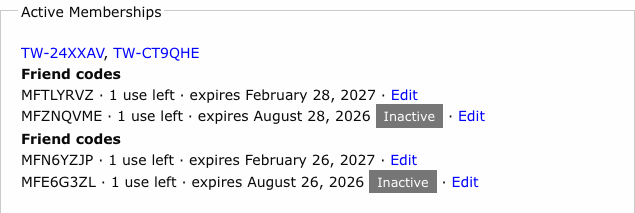
Theater users do not see the Active Memberships box or its friend codes.
Flex Pass Balances
For patrons with flex passes, this section shows:
| Field | Description |
|---|---|
| Flex Pass Name | The name of the flex pass purchased |
| Total Tickets | Number of tickets included in the flex pass |
| Tickets Used | Number of tickets redeemed so far |
| Tickets Remaining | Balance of unused tickets |
| Expiration | When the flex pass expires |
| Theater | The theater the flex pass is associated with |
Warning
Flex pass balances should be verified before redeeming tickets at the box office. If a patron believes they have remaining tickets but the balance shows zero, check the order history for the flex pass to see where all redemptions were applied.
Donation History
Donations made by the patron appear in the order history with a type of Donation. You can review:
- Date of each donation
- Amount contributed
- Associated theater or campaign
This information complements patron tags (such as "Donor Level") to give a complete picture of the patron's giving history.
Cross-Theater Activity
Because address records are shared across all theaters in Stagemgr, the patron history view consolidates activity from every venue:
- Orders from Theater A and Theater B appear in the same history.
- Memberships and flex passes are listed with their associated theater for clarity.
- Productions attended span all theaters for administrators and box office staff; theater users see only productions at their own theaters.
This unified view ensures that box office staff at any venue can see the patron's full relationship with the organization.
Using Patron History for Customer Service
Common customer service scenarios and how patron history helps:
| Scenario | Where to Look |
|---|---|
| "I bought tickets last month but lost my confirmation" | Order History -- find the order and resend confirmation |
| "How many flex pass tickets do I have left?" | Flex Pass Balances section |
| "Am I still a member?" | Membership Status section |
| "I came to your show last year, what was it called?" | Productions Attended section |
| "I made a donation, can I get a receipt?" | Order History -- find the donation order |
| "I think I have two accounts" | Review order history across records, then merge if confirmed (see Merging Duplicates) |