Merging Duplicate Patrons
Role: Administrators Only
Merging duplicate patron records is a permanent, irreversible operation restricted to administrators. Use caution and verify selections before confirming a merge.
Navigation: Admin > Addresses > Merge Selected, or Merge on the LGL Review list of the LGL Sync Status page
When Duplicates Arise
Duplicate patron records are created when:
- A patron purchases tickets using a different name variation (e.g., "Bob Smith" vs. "Robert Smith").
- Online purchases create a new record because the email or name does not exactly match an existing entry.
- Box office staff create a new record without checking for an existing one.
- A patron uses different email addresses for separate purchases.
- Group orders or will-call entries generate placeholder records that overlap with real patron records.
Tip
Regularly reviewing patron records for duplicates helps maintain clean data. Look for patrons with the same email address, similar names, or identical phone numbers.
How to Merge Duplicates
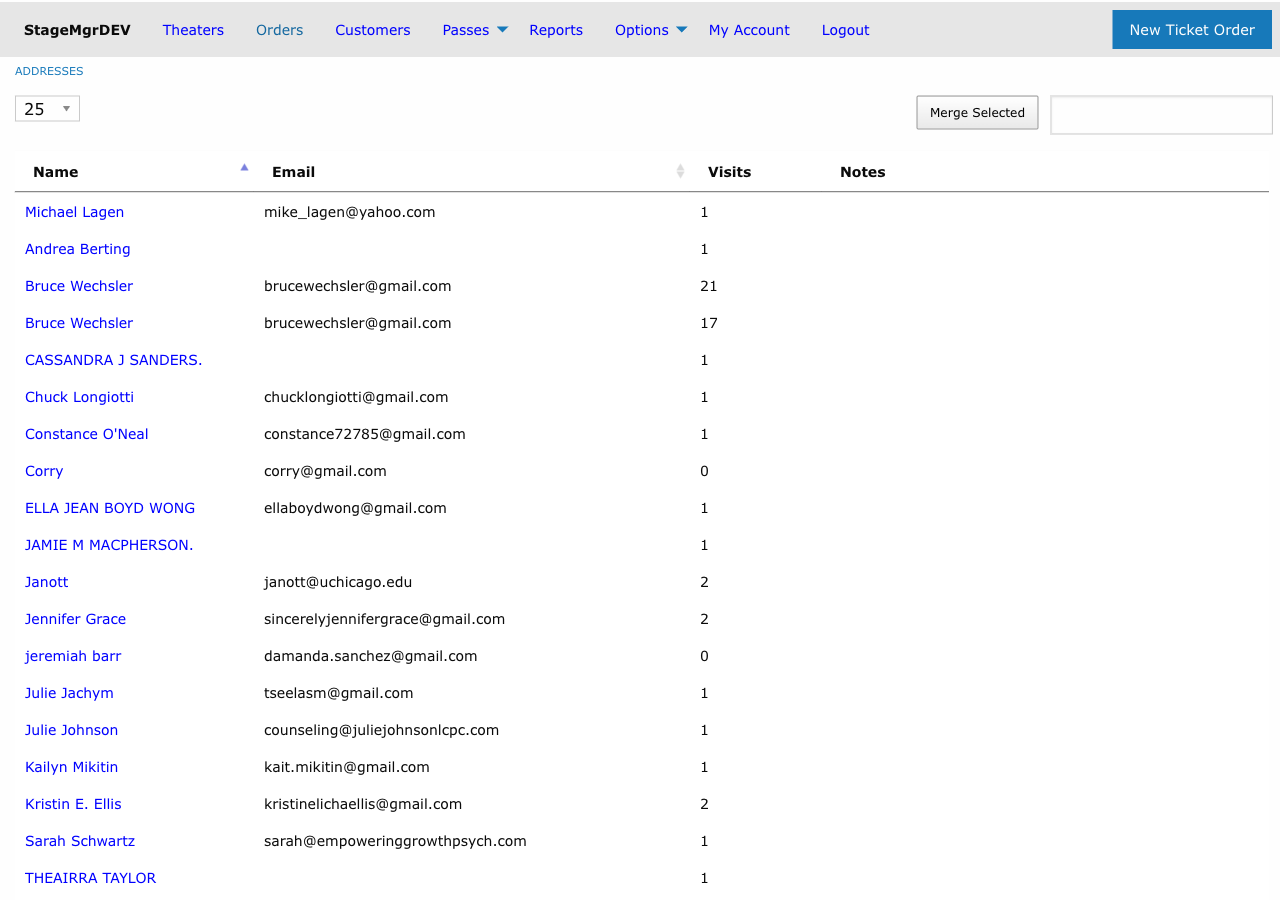
- Navigate to Admin > Addresses.
- Search for the patron whose duplicates you want to consolidate.
- Identify all duplicate records in the search results.
- Click each duplicate record's row to select it. Merge Selected is available when two to four rows are selected.
- Click Merge Selected. The Merge customers page opens.
- Choose the values to keep, check the summary, and click Merge into #id.
The Merge Customers Page
The page shows the selected customers side by side, one column per customer in order of customer ID. Each column heading is the customer's ID and name, linking to their page. The first column is the master: the original record (lowest ID), which is kept. Every other record is merged into it and deleted.
The rows are Name, Street address, Email, Phone and LGL constituent, followed by Active member, Donor, Orders and Last order for reference.
- Where the customers' values differ, each value has a radio button. Choose the one the master should end up with. Each starts on the newest record that has a value.
- Where they do not differ (the same value, or only one record has one), the values are shown as plain text and there is nothing to choose.
- The street address is one value: street, city, state and ZIP all come from the record you choose, so no part of another record's address is mixed in.
Each column heading has an Exclude link. An excluded customer is shown greyed out: it is not merged and keeps its own record, and its values cannot be chosen. Include brings it back into the merge. At least two customers must remain, so the Exclude buttons are disabled when only two are left. Excluding the master makes the next-lowest ID the master.
When the customers have different first names, a warning names them: they may be a household rather than one person. If one of them is a different person, exclude that record and merge the rest.
Below the table, a summary says which record is kept and which are deleted, which values come from records other than the master, and how many orders and memberships move to the master. It updates as you change the choices. When you came from the LGL Review list it also says the master will be re-linked to the LGL constituent, and the page shows the constituent's number with a View in LGL link when the LGL web address is configured.
Click Merge into #id to merge, or Cancel to go back without changing anything. After a merge from the Customers page you land on the master's page; after a merge from the LGL Review list you return to the LGL Sync Status page.
Original and Newer Records
A merge always keeps the original record, the one with the lowest ID (the one created first), and folds each newer record into it. The newer records are then deleted.
The original record is kept because it usually carries the most history: past orders, memberships and attendance. Folding the newer records in moves only their smaller amount of activity, such as a recent order, onto the patron's established record.
Merge Rules
| What | Result |
|---|---|
| Which record is kept | The original record (lowest ID). Newer records are deleted after the merge |
| Name, street address, email, phone | The values chosen on the Merge customers page. Each defaults to the newest record that has a value, so a blank never wins by default |
| LGL ID | The one chosen on the page. Any other LGL constituent the records were linked to is noted in an LGL Review tag on the original record, asking for the constituents to be merged in LGL |
| Tags for different theaters | Kept side by side. Two tags with the same label, such as External ID, both end up on the original record when each belongs to a different theater |
| Tags with the same label for the same theater | The newer record's value replaces the original's. Only one tag remains |
| Tags only on the newer record | Moved to the original record |
LGL Review tags |
Merging on the Merge customers page removes them from the original record: merging is how the review is resolved. The only one that stays is the flag the merge itself raises when the records were linked to different LGL constituents. Automatic duplicate consolidation does not remove them; the newer record's LGL Review tag replaces the original's like any other tag |
| VIP and placeholder flags | Set on the original if either record had them |
| Donor levels | The newer record's donor level, when it has one |
| Photo | Copied from the newer record only if the original has none |
| Orders, including gifts the patron received | Moved to the original record |
| Memberships and flex passes | Moved to the original record |
| Payments, pledges and donation history | Moved to the original record |
| Productions attended | Combined on the original record |
Warning
The merge operation is permanent and cannot be undone. The newer records are removed from the system after their data is moved. Always double-check that you have selected the correct records before confirming.
Merging More Than Two Records
You can merge up to four records at once. Stagemgr keeps the one with the lowest ID and folds the others into it, from the next-lowest ID to the highest. Name, street address, email, phone and LGL ID come from the records you chose on the page; for the other details in the table above, the newest record's values win wherever it has them.
The whole merge succeeds or fails as one. If any part fails, no record is changed and the page shows the error.
Before You Merge
Review the following checklist before performing a merge:
- [ ] Verify that the records truly belong to the same person.
- [ ] Check the chosen name, street address, email, phone and LGL constituent on the Merge customers page.
- [ ] Read the summary below the table: which record is kept, which are deleted and what moves.
- [ ] Review tags on all records. A tag on the newer record replaces the original's tag with the same label for the same theater, and any
LGL Reviewtag is removed by the merge. - [ ] Confirm you have administrator access.
Handling Contact Information Conflicts
Choose the better value on the Merge customers page. For example:
| Scenario | Action |
|---|---|
| The newer record has an outdated address and the original's is correct | Choose the original's street address |
| The patron's preferred email is on the original record | Choose the original's email |
| The name is spelled correctly only on the original record | Choose the original's name |
Details the page does not offer, such as tags, flags and donor levels, follow the Merge Rules. Correct them on the newer record before merging, or on the original afterwards.
Common Merge Scenarios
| Scenario | Recommended Approach |
|---|---|
| Same person, different email addresses | Choose the preferred email on the Merge customers page |
| "Bob" vs. "Robert" with same last name and email | Safe to merge. Choose the spelling to keep |
| Same name but different addresses | Verify they are the same person (check order history, phone) before merging |
| Placeholder record alongside a real patron record | The merged record keeps the placeholder flag if either record had it. Clear the flag on the patron's record after merging |
| More than two duplicates | Select up to four at once and choose each value on the page |
Restrictions
- Only users with administrator privileges can perform merges.
- Records associated with finalized orders can be merged (their orders move to the original record), but individual records with finalized orders cannot be deleted outside of the merge process.