Payment Types
Required Role
Only Administrators can create, edit, and delete payment types.
Navigation: Options > Manage Payment Types
What Are Payment Types?
Payment types define the methods of payment available when creating orders. Stagemgr comes with built-in payment types (Credit Card, Cash, Check) and allows administrators to create additional external payment types for situations like gift certificates, sponsor comps, or other custom payment methods.
Each payment type can be configured with:
- Who can use it -- public customers, box office staff, theater users
- How it reports -- whether payments count as sales collected and/or production revenue
- What automated tasks it suppresses -- for example, skipping confirmation emails for comp orders
Viewing Payment Types
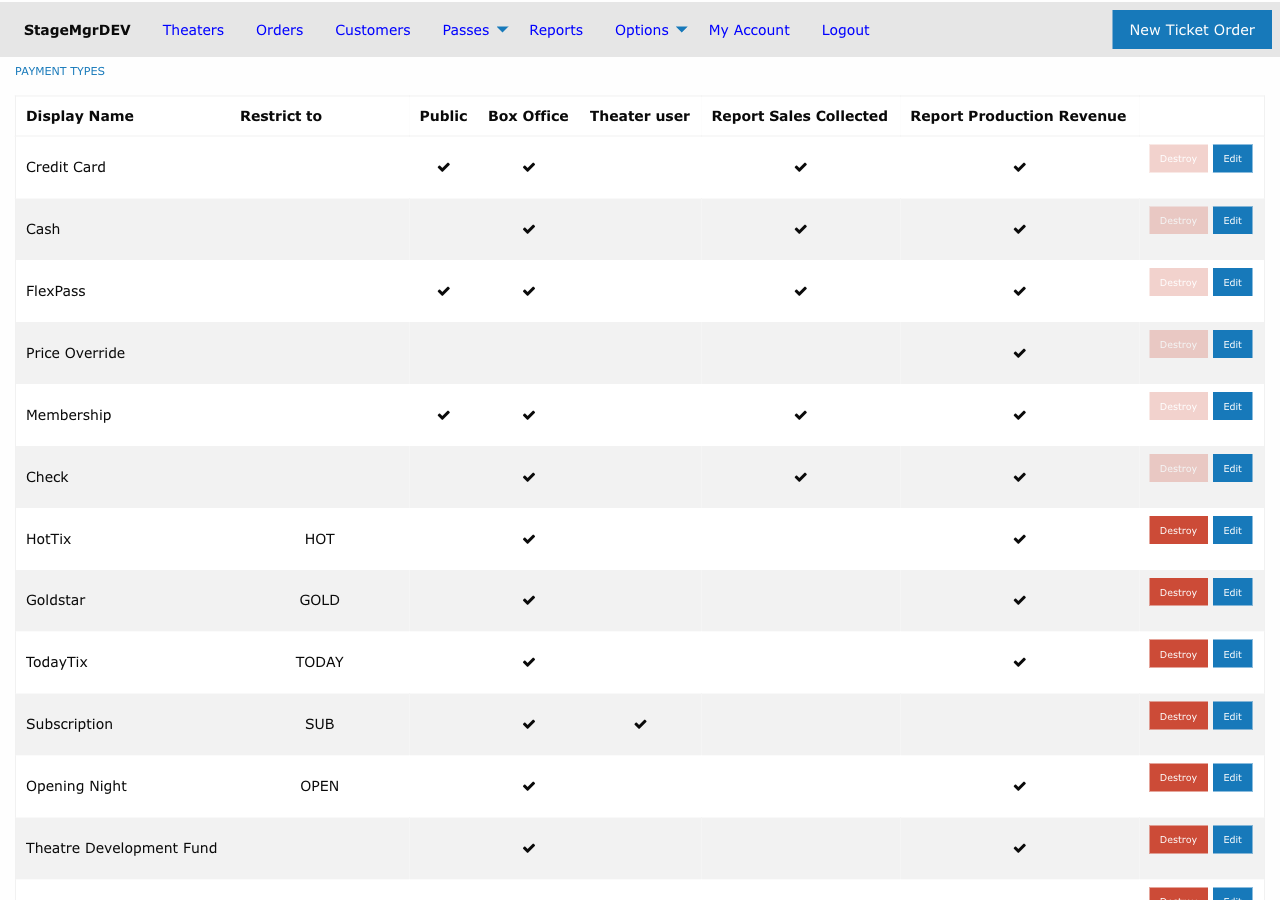
Go to Options > Manage Payment Types to see all configured payment types. The list shows each type's display name, availability settings, and reporting flags.
Creating an External Payment Type
Built-in payment types (Credit Card, Cash, Check, etc.) are pre-configured. To add a custom payment type:
- Go to Options > Manage Payment Types
- Click New External Payment
- Fill in the form fields described below
- Click Create Payment Type
Payment Type Form Fields
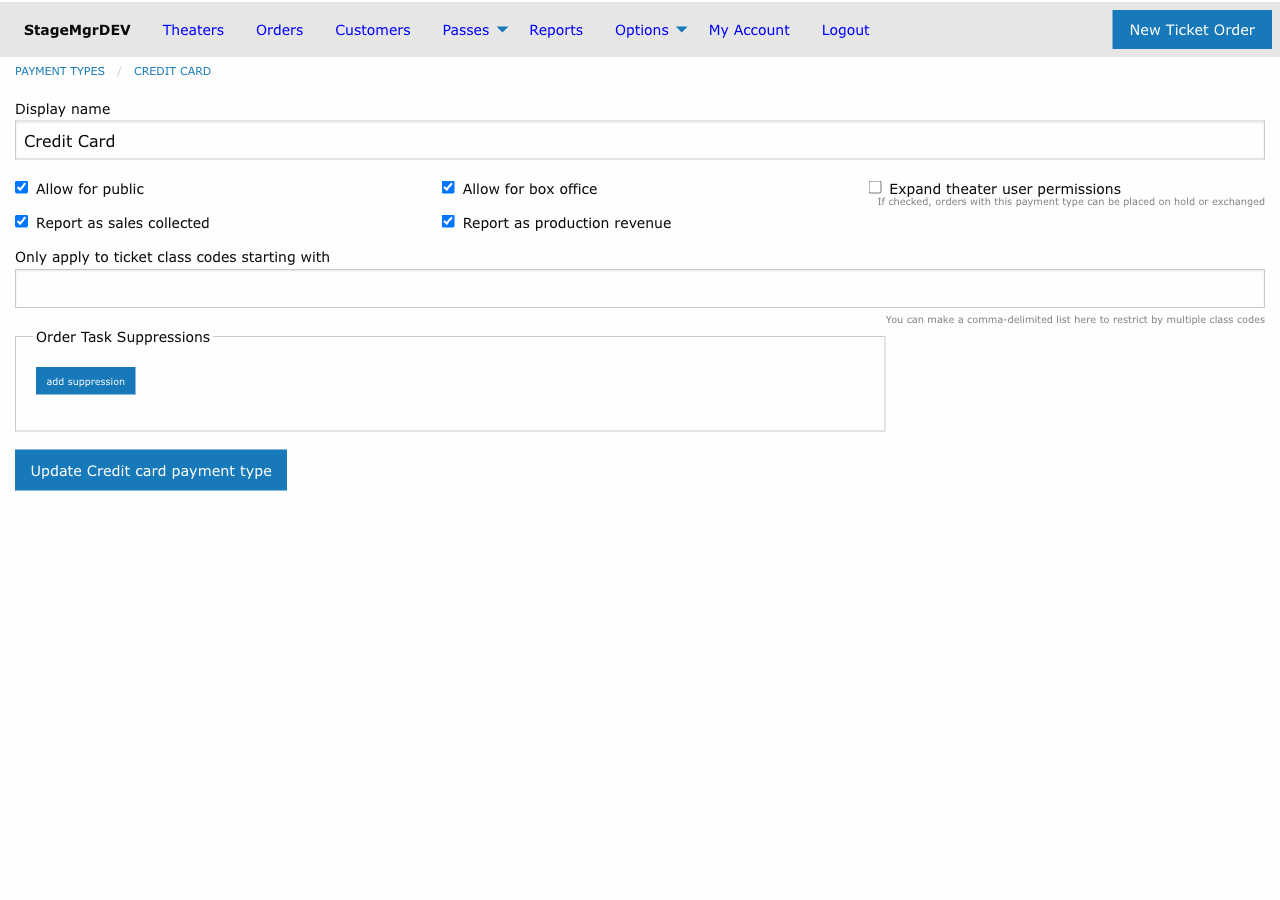
Display Name
The name shown to users when selecting a payment method (e.g., "Gift Certificate", "Sponsor Comp", "Board Member Comp"). Must be unique across all payment types.
Availability Checkboxes
| Field | Default | Description |
|---|---|---|
| Allow For Public | Off | If checked, this payment type is available to patrons purchasing online through the public website |
| Allow For Box Office | On | If checked, this payment type is available to box office staff when creating orders in the admin interface |
| Expand Theater User Permissions | Off | If checked, Theater Users can place orders on hold or exchange orders using this payment type. Without this, Theater Users have very limited payment capabilities. |
Theater User Holds
The "Expand theater user permissions" checkbox is important for visiting companies that need to place hold orders for their subscribers or VIP guests. It allows Theater Users to create orders with this payment type without requiring Box Office or Administrator access.
Reporting Flags
| Field | Default | Description |
|---|---|---|
| Report As Sales Collected | On | Include payments of this type when calculating total sales collected. Turn off for payment types that don't represent actual revenue collection (e.g., comps). |
| Report As Production Revenue | On | Include payments of this type when calculating production revenue. Turn off for payment types that shouldn't be counted in production financial reports. |
Only Apply to Ticket Class Codes Starting With
An optional restriction field. Enter one or more ticket class code prefixes (comma-separated) to limit this payment type to orders that include tickets from matching classes.
For example, entering COMP would restrict this payment type to only work with ticket classes whose codes start with "COMP". Leave blank to allow this payment type with any ticket class.
Order Task Suppressions
Order tasks are automated actions that run after an order is processed -- sending confirmation emails, adding patrons to email marketing lists, etc. You can suppress specific tasks for orders paid with this payment type.
This is useful for comp orders or internal orders where you don't want to trigger patron-facing communications.
To add a suppression:
- Click add suppression in the Order Task Suppressions section
- Select the Type (the category of task, e.g.,
OutreachTask) - Select the Method (the specific action to suppress, e.g.,
ticket_confirmation) - Add more suppressions as needed, or click remove to delete one
Note
The available task types and methods are configured at the system level. Common suppressions include skipping ticket confirmation emails for comp or internal payment types.
Editing Payment Types
Click Edit next to any payment type to modify its settings. Changes take effect for new orders -- existing orders that already used this payment type are not affected.
Deleting Payment Types
Click Destroy to remove a payment type. A payment type cannot be deleted if any orders have payments of that type. This prevents orphaned payment records.
Payment Type Visibility by Role
| Role | Sees Payment Types Where... |
|---|---|
| Public (not logged in) | Allow For Public is checked |
| Theater User | Allow For Public is checked OR Expand Theater User Permissions is checked |
| Box Office | Allow For Box Office is checked |
| Administrator | Allow For Box Office is checked |